Voice input.Automatic structuring.Finalization.

Built by a radiologist who spent 20 years switching between the scan and the keyboard — and got tired of it.

RRadVoiceAssembling report…
00:14
OrgansLiver normal in size, smooth contours, homogeneous structure.
Impression
Dictation modes

Right now I am testing two dictation modes.

Both end the same way — a structured radiology report. The difference is how you dictate: one continuous stream, or aimed straight at a specific field. I need to learn which one fits the real working rhythm, so both are open to everyone.

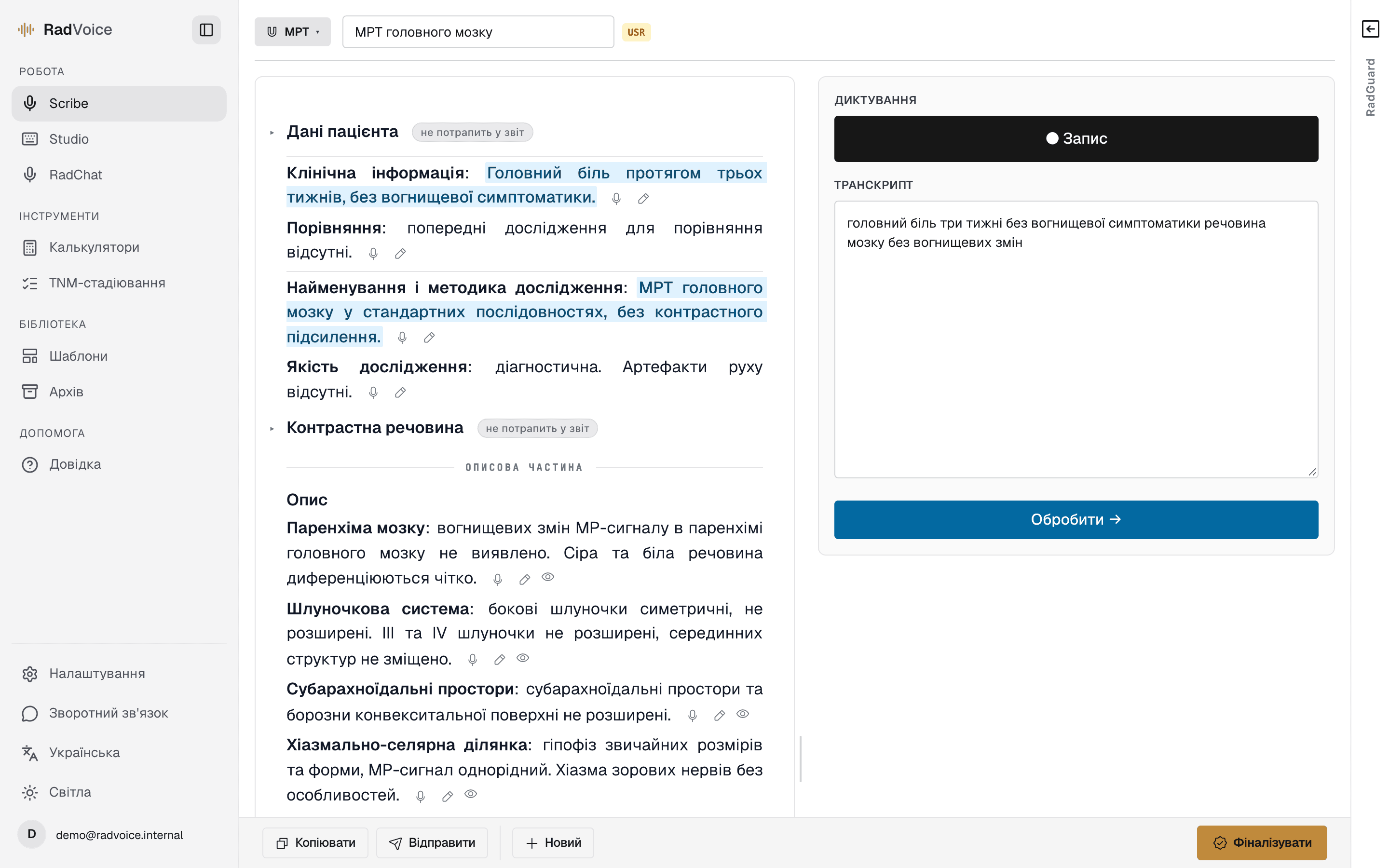
Scribe

stream

You dictate everything — the model sorts it.

Dictate the whole report as one continuous take, without thinking about structure. The text is cleaned of slips, polished into radiology prose — and the model distributes it across the blocks of your template. All that is left is to review.

The simpler flow · works from a phone too

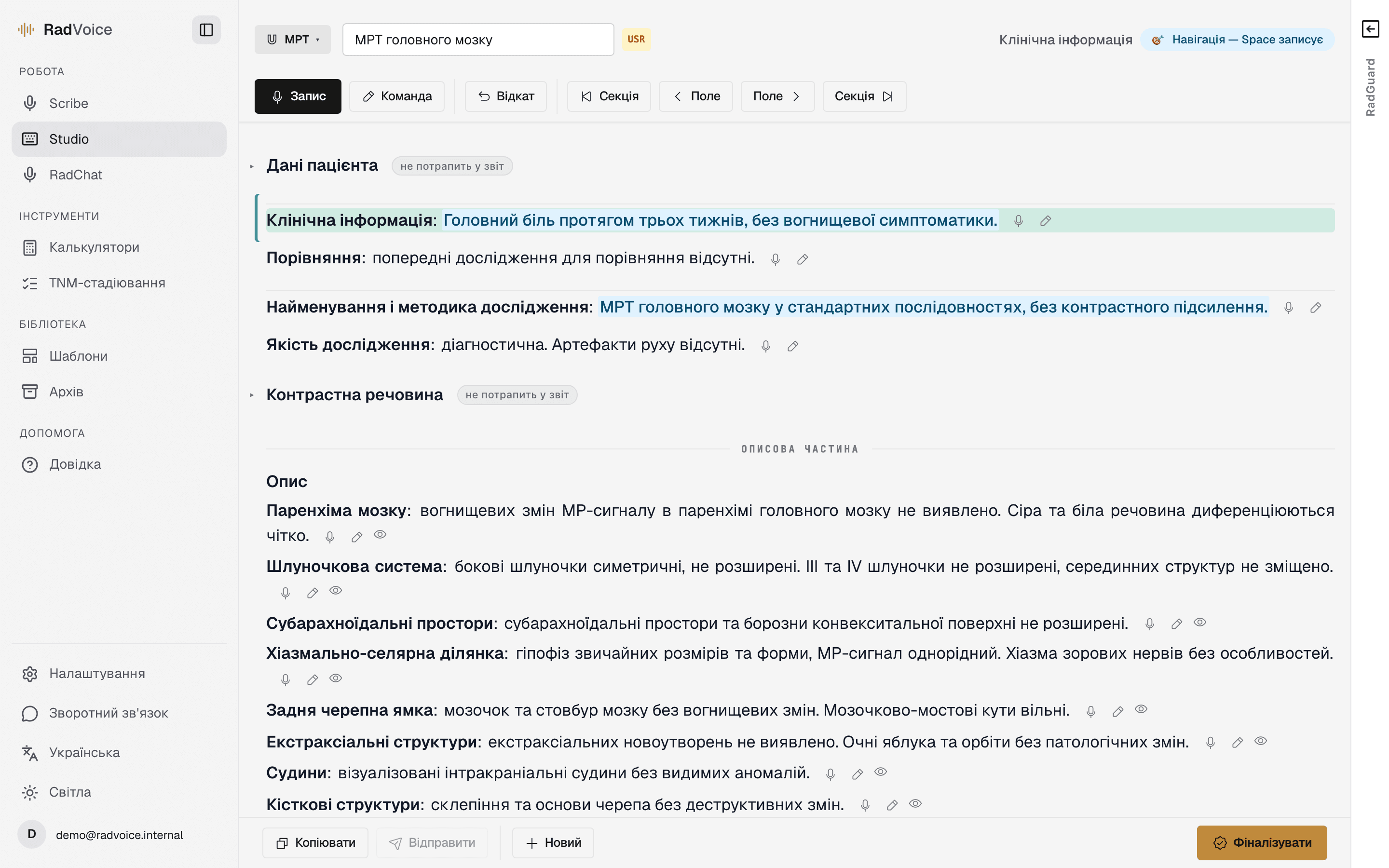
Studio

aimed

You dictate straight into the block you need.

Pick a report field — with the keyboard or Philips SpeechMike buttons — and dictate directly into it, no mapping step. The text lands exactly where it belongs, and you can edit it by voice.

2–3× faster with a physical keyboard

Either way, the output is a finished structured report: into your medical system, as a document, or emailed.


Origin

How this came to be.

I started working as a radiologist in 2008. Ukraine’s major cities were only beginning to assemble their CT and MRI fleets, and I was already watching how colleagues in the US and Europe did it. The workflow gap was striking: their output was higher not because they evaluated images better — because for over 25 years they had tools that cut reporting time and gave it back to the study itself.

That bothered me all these years. I tried everything available — general dictation apps, Google Speech-to-Text, every service I stumbled onto. None of it was built for radiology.

When LLMs became adequate, the window opened: the existing infrastructure was enough to build a solution for myself. I built a local app, used it for six months on my own studies — and at some point it hit me: "Sasha, you can let other people use this too."

Radiologist’s desk: a MacBook and coffee on a wooden table with a mountain view

My desk, 2015 — somewhere in the mountains of Georgia

And this is where the scaling problem begins — the way I work as a remote radiologist is fundamentally different from the way a radiologist works on-site at a clinic. RADVOICE is now in early testing: introducing the Ukrainian radiology community to voice reporting, gathering feedback, rewriting whatever does not match the realities of on-site work.

If you are a radiologist and you tried it — email me. That’s the point of this stage.

— O. Berezovskyi · radiologist


Problem

The radiologist’s day isn’t eaten by the scan. It’s eaten by the keyboard.

An average report is dozens of switches between DICOM and text, copying the template, patching leftover artefacts from previous cases, picking up the oncologist’s call mid-paragraph. Dictation tools have existed in the world for over 25 years and take most of that load off. But radiology workflow is its own genre: specific vocabulary, report structure, constant interaction with the scan and interruptions. General solutions don’t fit out of the box.

The result — text eats hours that should stay on the studies themselves.

  1. 01Read the study
  2. 02Dictate
  3. 03Proof the text
  4. 04Finalize
  5. 05Next study

RADVOICE removes the constant switching between image and text — and puts focus back where it belongs.

Clinical depth

200+ structured templates — built on the standards you already use

Nine modalities — MRI, CT, ultrasound, X-ray, PET, nuclear medicine, mammography, DEXA, CBCT — including 17 oncology TNM-staging templates. Build your own template — or send me a request and I will add yours. Institutional protocol sets for clinics, visible only to their radiologists, are already live.

200+templates
9modalities
17oncology TNM

PI-RADS

Prostate

LI-RADS

Liver (HCC)

BI-RADS

Breast

TI-RADS

Thyroid

O-RADS

Ovaries

Lung-RADS

Lung screening

And 25+ more: CAD-RADS, C-RADS, Bosniak, Couinaud, TNM, RECIST, Fleischner, RANO, ENZIAN, ASAS, Lake Louise, Deauville, Kellgren-Lawrence, Cobb, Graf, Tokyo, ISCD…

Safeguards

A report that will not let the critical slip.

Everything that matters stays in view: unmapped dictation fragments, the source of every sentence, and Safety Gate — a report-consistency check before finalization.

  • 01

    Any fragment of dictation that did not make it into the report is highlighted in the transcript — it cannot be lost quietly.

  • 02

    Hover a section of the report and its source lights up in the transcript, and vice versa. The origin of every sentence is one mouse-move away.

  • 03

    Safety Gate: before finalization a separate LLM pass re-reads the findings and the impression and looks for internal contradictions — an impression that asserts a side, grade, or diagnosis absent from the findings or at odds with them, or findings that hedge ("cannot be excluded") while the impression is categorical.

  • 04

    Alongside it, a deterministic check verifies the template’s mandatory checklist items and left/right consistency. None of the checks block — the final decision is always the radiologist’s.

Changelog

What’s new

  • Until now the whole study was sent for recognition as a single large chunk the moment you pressed stop — and if anything went wrong on a long take, the entire session was gone. The recording is now split roughly every minute, at pauses between phrases, and each piece is transcribed separately while you keep dictating. Text appears in batches as you work, and a failed piece costs you a minute rather than the whole study.

  • A big step for working next to the scanner: buttons and fields are sized for a thumb, panels no longer hide behind the keyboard, RadGuard opens as a bottom sheet, and chat gets its own tab instead of three cramped columns. Dictation survives a screen lock or an incoming call, copy and Share work on iOS, and on a weak connection the upload retries instead of quietly losing the take.

  • Report text is captured both on copy and on finalize — the archive keeps exactly what you saw on screen. Edits in fields are stored as you type, so a deleted fragment no longer reappears after the next dictation. And on a poor connection the template library honestly shows an error with a Retry button instead of pretending the templates do not exist.

  • A new recognition engine and a streaming mode in Scribe: words show up in the transcript field in real time, and on stop the text is automatically polished into radiology prose. Feel free to pause for half a minute over an image — the take keeps going as if the pause never happened.

  • Every system template in the English locale is now genuinely English — from CBCT implant planning to pediatric protocols. Terminology follows the canonical classification systems (BI-RADS, Lugano, Graf, Lake Louise).

  • The dark theme has been reworked: no more glowing white-on-black text (the OLED halo effect), contrast tuned to WCAG. The processing overlay no longer flashes white in the middle of image review.

Contacts

A direct line to the author.

Monobank QR jarscan · donate
Monobank jar — project support

Support the project.

A free tier with limits and a paid tier for daily use are coming, otherwise the infrastructure this runs on won’t pay for itself. The Monobank jar is voluntary support that pushes that day further out.

Open jar

If you’ve read this far —

Then we’re probably colleagues :) Questions or ideas — reach out.

Create your first report ▸